Think of one thing you did three times this week. Keep it in mind. I will come back to it.
By the end, you will have a set of skills you can use to build your own workflow. They are public in agents-library, and I explain them at the end. Use them as they are, change them, skip a stage, repeat one, or add your own. The workflow is yours. The building blocks come from principles that have always been part of programming; agents give us new ways to apply them.
Why believe me#
In the 90 days to 10 November I merged about 1,000 pull requests across 19 repositories, and opened about 900 issues. Half of those pull requests were merged within three hours of being opened. In the same 90 days a year earlier, I merged one.

I do not like these numbers much. They say how much moved, not whether it was right. The useful question is how to merge ten pull requests a day and still know what ships. I will show one change from request to release, then the lifecycle and habits behind it.
Principles and practices#
Most advice about coding agents is about a tool, and the tool changes every month. It is hard to say something that is useful today and still true in a year.
So I split everything I do into two kinds.

λ is the decay constant: the larger it is, the sooner a thing stops being true. And yes, it is also the logo of a specific old game, Dr. Gordon.
Principles · years The development lifecycle gives us building blocks. What you repeat three times becomes part of the system.
Practices · months, hopefully
The tools and habits below are how I apply those principles today. Green boxes mark the principles; amber labels mark my practices. If you are reading this long after I posted it, keep the principles and adapt the practices.
Follow one change#
Here is one change, start to finish. It is from Earheart, my open-source dictation app: search the History of what you dictated, and delete a single entry. Everything below is public, so you can open each step.

The trail is open to inspect: the request and its acceptance criteria, the plan, the code and test results, the review, and the release.
Three moments in that trail are the reason I work this way.
A bug was caught before any code existed. The plan said: when an entry is deleted, also drop the saved copy of a dictation if its text is the same. A second agent, whose only job was to attack the plan, pointed out that the same words are not the same dictation. Deleting an old entry would have thrown away a newer one that happened to say the same thing. The plan changed to match by identity, and the bug was never written.
A test was proven to fail. The agent wrote a check for a slow, outdated search answer arriving late and replacing the newer one. Then it removed its own fix, ran the check, and watched it fail: 145 of 146. Then it put the fix back. That shows the check can detect the bug it was written for.
A reviewer refused to review. When the fixes came back for a second look, the commit named in the reviewer’s brief did not match the commit in front of it. It stopped and said so, and marked nothing as fixed. It ran again once the commit was right.
The useful result is what the process caught: a mistake in the plan, a regression the test could detect, and a review aimed at the wrong commit. Here is the structure that made those catches possible.
Trust the agents to do the work#
There are two common ways to work with a coding agent.
The first is to watch it. You read every line as it appears and approve every command. It feels safe. It does not scale past one agent, and it turns you into a slow reviewer of your own tool.
The second is to accept the summary as the result. It feels fast, until the agent tells you the tests pass and they were never run.
I trust the agents to build, verify and review. Verification relies heavily on scripts; other agents review the work. I do not repeat those stages myself. The system gives the agents a way to check each other’s work and produce evidence beyond a summary.
The software development lifecycle#
Principle 1 Define, plan, build, verify, review and ship are building blocks you can arrange into your own workflow.

None of this is new. Teams worked this way long before agents. Somewhere in the excitement, we forgot that. We expected AI to change how we work, and assumed the principles we had learned no longer applied.
We still need to decide what is worth building, understand the code, check that a change works, and get it to users. Agents change how we do those things and who does them. The principles still apply, even when the practices look completely different. Without verification, mistakes reach users. Without a clear outcome, even a fast agent can spend its time solving the wrong problem.
| Stage | The question it answers | What I keep |
|---|---|---|
| Define | What is worth doing next? | The decision |
| Plan | How, exactly, in this code? | Reading the plan |
| Build | Does the code exist? | The rules it builds under |
| Verify | Does it work? | Acceptance criteria |
| Review | Is it right, and does it fit? | Review standards |
| Ship | Is it running for users? | An approval, sometimes |
Two things make it a lifecycle and not a checklist. Each stage hands the next one something written: an outcome, a plan, a pull request, evidence, findings, a release. What users do with the release feeds the next Define. A failed check sends the work back to Build; a flawed approach sends it back to Plan.
A stage does not need its own ceremony. For a small fix, planning might take one sentence; a risky change might need several rounds of verification and review. Choose the steps deliberately and understand what each one gives you.
Define: decide what to work on next#
Principle · Define Deciding what to build stays with a person. Ask for one outcome, not a list of tasks.
Talk to your user, your client or your own imagination, then pick one outcome. The user tells you what hurts. The client tells you what they pay for. Your imagination tells you what nobody has asked for yet.
Write the outcome and its boundary. “Let me delete one history entry without losing the others” gives the agent room to choose an implementation and gives you something to accept or reject. An ambition such as “keep the app crash-free” still needs a bounded first change.
Define is done when you can say what success looks like and what is outside the change.
Practice · what I do today
A weekly standup feeds this stage; it is “My Monday”, further down. Production feeds it too. I already monitor errors, and an error that keeps coming back, or a page that is up but far too slow, is something to work on next.
Plan: grounded in reality#
Principle · Plan The plan is grounded in the code, and it is the plan the agent builds from.
Give the agent the relevant code, docs, issues, call transcript and repository history. Ask it to inspect the implementation before proposing changes.

Grounded means the plan names files and functions, not feelings: what changes, in which order, and what proves each step.
Practice · what I do today
I ask for all the questions up front and answer them once. The plan carries the answers. A plan is a document I can read in five minutes. I read every plan for work that touches money or data. For small ones I skim the list of files and let it through.
Build: stay out of the way#
Principle · Build One writer per branch. What it delivers is a pull request, never a commit on main.
The agent writes the code, on its own branch, in its own copy of the repository. I do not read the keystrokes. I read the plan going by: which step it is on, what it decided when the plan turned out to be wrong, whether it stopped to ask.
The agents need somewhere to run where I can see them and step in.
Practice · what I do today
Today that is a terminal on one machine that stays on, which I reach from whatever device I have with me. The tool will change. The need to see and to intervene will not.
Verify: evidence, not reports#
Principle · Verify Verify is about evidence the agent produces, not claims it makes.

Practice · what I do today
The agents run verification, heavily powered by scripts. Scripts handle repeatable checks; agents inspect the results, exercise the app and investigate failures. I do not run a second manual verification pass.
The evidence they produce:
- Test results from scripts, with commands, exit status and output.
- Screenshots the agent took and looked at. An agent that can open the running app and look at it catches what a test does not.
- A real deploy to staging.
- Acceptance checks, exercised by the agents and automated in scripts wherever possible.
Review: three questions, then one concern each#
Principle · Review Review one identified commit, challenge the implementation, and support findings with evidence.
I ask three questions of every pull request. Does it fit the architecture? Is it correct? Can it be simpler or faster?

A useful finding names the file and line, explains what can go wrong, and gives a way to check it. The reviewer needs the requirements and the diff, but should reach its own conclusion before reading the writer’s verdict.
Practice · what I do today
I use a reviewer from a different vendor to vary the perspective; that alone does not guarantee it will catch a mistake. I also run reviewers that each have a single concern: dead code, missing tests, security hygiene, documentation gaps. One question each, and each opens its own small pull request. The list is in the appendix.
The agents handle the findings and check the fixes. I trust them to perform the review; I do not add a personal code-review pass. An approval or merge decision is separate from doing the verification and review myself.
Ship: usually automatic#
Principle · Ship A merged change reaches its users without anyone remembering to do anything.
Once the checks live in CI, an agent’s pull request and mine are held to the same bar.
Practice · what I do today
Mine run in CI: the tests, a check on the pull request title because the release script reads it to pick the version, and a release that writes its own changelog entry. Scripts carry a merged pull request to staging and production. The only place I appear is an approval, and on some projects not even that.
What you repeat three times becomes the system#
Principle 2 The first time, I do it. The second time, I notice it. The third time, I build it into the system.
It is the same rule I use when I refactor code. Two copies are a coincidence. Three are a pattern, and a pattern gets a name and a single place to live. The rule works on habits the way it works on code.

Look for the next piece of your system in the logs you already keep:
Practice · what I do today
- Shell history → a tool.
gupisgit switch main && git pull. A sequence I kept typing became a name both the agent and I can call. - Agent sessions → a skill. Repeated corrections reveal a workflow worth writing down once. Keep the decisions and checks; drop instructions the model no longer needs.
- Repository history → an enforced check. The same fix or review comment keeps returning? Turn it into a lint or test when you can describe the failure precisely.
- Agent memory → a reviewed rule. Read its notes about you. Keep what is still true, correct what it misunderstood, and remove what no longer applies.
Put each repetition where it can be handled reliably. A preference can stay in prose. A workflow that needs judgement belongs in a skill. A mechanical check belongs in a test or CI job that blocks a merge when it fails.
The skill itself gets the same treatment. If an agent runs the same five commands every time, make them a script. Let code handle the fixed sequence and leave the decisions to the model.
Every few weeks, prune the result. Rules become obsolete, contradict each other, or describe mistakes fixed upstream. Ask whether each one still earns its place.
The goal is to make the easy thing the right thing. Agents take shortcuts, so shape the environment until the shortcut is correct. It works the same way for a new hire.
My Monday#
Practice · my week
The Earheart example shows one finished change. Here is how I turn a messier conversation into work worth starting.
On Monday there is a standup. It is weekly, not daily. I save the transcript, and I keep a notebook of what we decided to work on.
I give an agent the transcript, its summary, and my notes. Each preserves something different: what was said, what seemed important, and what I decided.

The agent flags disagreements; I resolve them before it files issues. The transcript might say one thing and my notes another. Five similar complaints in one call are one issue with a theme, not five issues.
The agent files the issues, each one written next to the code: files, what done looks like, how to check it. I read every line of the ones that touch money or data. The small ones I let through.
I speak most of this. A hotkey, I talk, and the cleaned text lands in the prompt. My changes of mind stay in the text, so the agent sees how I got there.
By lunch there is a set of issues with decisions attached. Those are the inputs to Plan.
Start with one stage#
Take the thing you thought of at the top and choose one change it could improve. Start by handing over Verify: it has a clear input, a running change, and a result you can inspect.
1. Name what must work#
Write one acceptance criterion before asking the agent to test. For the history example:
Deleting one entry leaves another entry with identical text intact.
Check: could someone who did not write the code tell whether it passed?
2. Ask for evidence you can inspect#
Give the agent the change and the criterion:
Find and run the relevant tests. Show the commands, exit status and results. Exercise the acceptance criterion in the running app. For a UI change, take and inspect screenshots. Report anything you could not check.
Check: open the output and the screenshots. If a test is meant to catch a bug, ask the agent to demonstrate that it fails without the fix in a disposable working copy.
3. Make the useful check repeatable#
Save the command as a script or project task. Run it from a clean checkout, then add it to CI and require it before merging. Keep manual checks explicit where automation is incomplete.
Check: deliberately break the relevant behaviour on a throwaway branch. The check should fail there and pass with the fix restored.
You now have one stage with evidence and one repeatable check. Next, add a separate review, then capture the workflow as a skill when you have used it enough to know what belongs in it.
It will not work unless#
The failures behind this setup were ordinary ones: two agents editing the same files, a model grading its own work, and “tests pass” accepted without a run. The lifecycle gives each of those a place to be caught.
The remaining constraint is the reach of the tools you hand over. Each new capability needs a boundary and a way to check its consequences.

Build an agent that scares you a little, but add capabilities one at a time. A browser, database access or SSH changes what it can accomplish—and what a mistake can damage.
Practice · what I do today
Each tool comes with its own guardrail. The browser gets a throwaway profile. The database is a copy, or a read-only user first. The SSH keys go to a staging host before production. Docker runs in a container per project, and the Docker socket stays out of that container unless I mount it on purpose, because a mounted socket is the host.
Grant autonomy only as far as you can verify the consequences. When a new tool makes you uneasy, name the failure you are worried about and add a check or limit for it.
The short version#
The lifecycle gives each change a path from a decision to a release, with evidence at the handoffs. The rule of three improves that path: repeated work becomes a tool, a skill or an enforced check.
About a thousand pull requests in 90 days went through this. The count shows how much moved. The Earheart trail shows the more useful part: mistakes caught before they reached users.
Pick one repeated task, hand over its verification, and keep the check that proves it worked.
P.S. The lifecycle still has a gap at the end: after Ship, I am the one who notices that something broke. What I want to build next is that last arc. An error becomes an issue, the issue becomes a fix that is verified after it deploys, and one channel tells me what the loops did and what they need from me. It is a plan, not something that runs today.
Appendix: what I run today#
Practice · November 2026
Use this as a reference if you want to try the workflow. The article’s principles do not depend on these tools.
The skills#
My skills are in agents-library, and they are public. A skill is a workflow written down in words, which an agent loads when you type its name.
There is one skill for each stage of the lifecycle:
- Define:
/define. Turns a loose request into a problem statement, a scope (in and out) and done-criteria, and writes them to the issue. - Plan:
/plan. Breaks the issue into small tasks that can each be verified, with acceptance criteria and an order. Writes no code. - Build:
/build. Works one task at a time, test first: a failing test, the minimum code to pass, the full suite, one commit. - Verify:
/verify. Exercises every acceptance criterion end to end, records pass or fail, and lists the gaps. - Review:
/review. Reads the diff for correctness, readability, architecture, security, performance, dead code and stale docs, and verifies each finding before reporting it. - Ship:
/ship. Pushes the branch, opens a pull request that links the issue, and marks it ready when everything is done.
And four that sit around it:
/manager. Turns the session into a console that runs one coordinator per work item, through plan, build, review and test, to one pull request. It never does the work itself. How it works is a separate article./file-issues. A long-lived session that turns each thing I describe into a well-formed issue, after searching for duplicates. It never edits code./batch-merge-prs. Merges a list of pull requests onto one new local branch, then runs the tests and reviews the result. It never pushes./review-ux-psychology. Reviews a flow’s defaults, framing and progress to move one named metric, such as signup or checkout.
The reviewers with one concern#
These are the single-concern reviewers from the Review stage. They are in the same repository. Each picks one problem, fixes every instance of it, verifies the result and opens a pull request.
| Agent | Its one concern |
|---|---|
architect | Code that bypasses a layer boundary or duplicates a shared helper |
deadwood | Dead code: unused imports, unreachable branches, orphaned files |
docbot | Missing or stale documentation |
refactor | Small refactors that do not change behaviour |
sentinel | Security hygiene: missing auth guards, leaked error details, hardcoded secrets |
testforge | Gaps in the test suite, weak assertions, flaky tests |
uidesigner | Visual design that drifts from the project’s own tokens and components |
uxpolish | Frontend friction: missing loading, empty and error states, labels, keyboard handling |
Take them, change them, or write your own. Other people’s skills combine well, but everyone should have their own set of knives.
The rest#
- Chief of Staff is the same lifecycle drawn as a workflow. It is a plugin for BB that takes GitHub issues, or tasks I describe, through steps I draw: plan, my approval, build, review, ship. Each step can name one of the skills above, and a board shows where every task is and whether an agent or I have to act next.
- Earheart is the dictation app from “Follow one change”. It is also how I speak my prompts.
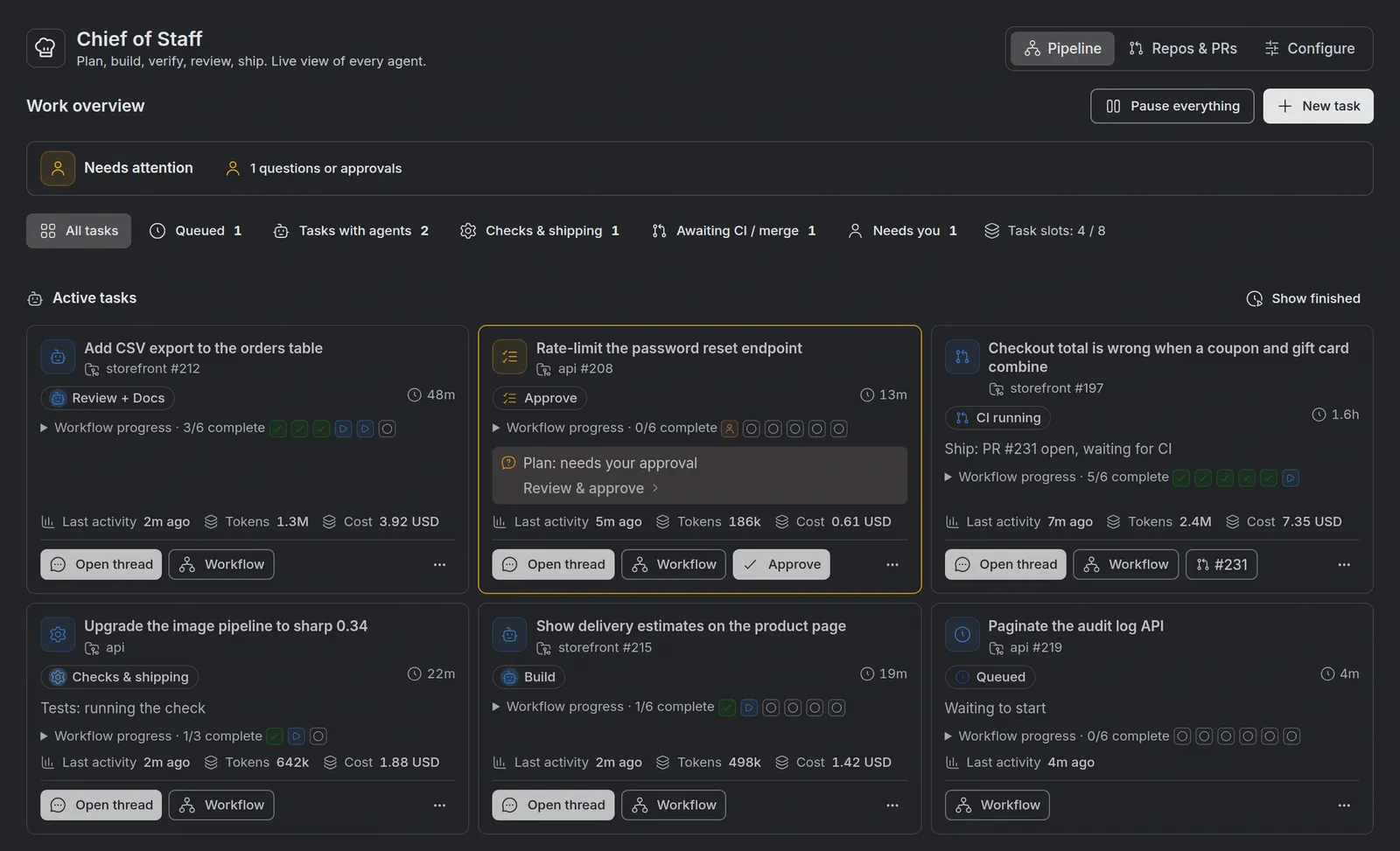
Chief of Staff in BB, with demo data: six tasks at different stages, one waiting for plan approval. Open the full-size screenshot to read the cards.