Earheart #
Talk to your coding agents.
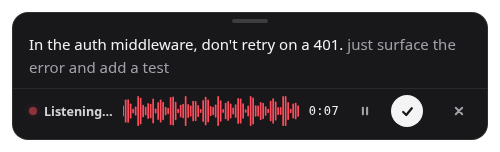
Press a hotkey, say what you want, press again — the prompt lands in Claude Code, Codex, Cursor or whatever has focus. Speech-to-text and cleanup run inside the app, so your voice, your code and your unshipped ideas never leave your machine.
Why you'd use it
- The prompts that work with an agent are long — context, constraints, the three things you tried. Speaking them is faster than typing, so you send the whole thought instead of a one-liner and three corrections.
- Nothing leaves your machine: no account, no telemetry, no cloud. What you say to an agent is your architecture and your unreleased work, and it stays on your disk.
- Works in any app with no integration — a terminal running Claude Code, Cursor’s chat, a GitHub issue, an email. It pastes; you review and press Enter.
- Cleanup made for spoken prompts: ums and false starts go, your wording and intent stay. A dictionary teaches it
pnpm,kubectl,useEffectand your teammates’ names. - Install and go — a wizard downloads the models once; after that transcription runs faster than realtime, even on CPU.
Why it's cool
- Both models run in-process — NVIDIA Parakeet TDT 0.6B v3 (25 languages) through sherpa-onnx, Qwen3 4B Instruct for cleanup — with no sidecar server, no Python and no localhost socket.
- Live transcript: the overlay fills in words as you speak and a cleaned-up version settles in behind them on pauses, without ever stealing focus from the app you are dictating into.
- Every stage is modular and OpenAI-compatible, so you can mix local STT with a hosted LLM, point it at Ollama, Groq or OpenRouter, or run its
earheart-sttserver for other tools. - Signed releases that update themselves in place on all three platforms, with a checksum-verified download and a changelog on the dictation bar.
- Plain JavaScript, no bundler, two runtime dependencies — easy to read, easy to hack on.
Quick start
# Download the installer for your OS, run it, finish the wizard.
# Then, with the cursor in your agent's input:
Ctrl/Cmd + Shift + Space    # speak…
Ctrl/Cmd + Shift + Space # …and the prompt is pasteddrove #
Local models on demand.
One OpenAI-compatible endpoint in front of llama.cpp and a built-in ONNX speech worker. drove wakes a model on the first request, streams the answer, and puts it back to sleep when it goes idle — so your GPU is never pinned by something you used an hour ago.
Why you'd use it
- Point any OpenAI SDK at
localhost:8080/v1and ask for a model by name. It loads on first use and unloads itself — no daemon per model, no remembering flags, no idle VRAM. - Text, vision and speech-to-text models share one port and one lifecycle. Earheart, scripts and chat clients all talk to the same endpoint.
- A memory budget you set: keep several models hot, and the least-recently-used idle one is evicted to make room.
- Smart downloads from HuggingFace — a quantization picker, sharded models, projector files auto-detected for vision models, partial downloads resumed.
- A terminal chat client with sessions and themes, and a request/response log browser (TUI and web) for when you need to see exactly what a model was sent.
Why it's cool
- The prompt cache survives sleep: a woken model picks up the KV cache it had before it went idle instead of re-processing the whole prompt.
- Backends are chosen per model from the file type —
.ggufstartsllama-server,.onnxstarts the built-in ASR worker — so adding a kind of model never touches the proxy. - Hot config reload: edit the TOML while the server runs and the change is picked up, with per-model llama.cpp flags layered over global defaults.
- Live status with tokens per second, time-to-first-token and idle timers — the numbers you actually tune a local setup by.
- Direct llama.cpp underneath, not a fork: new quantizations, kernels and flags work the day llama.cpp ships them.
Quick start
uv tool install 'drove[asr] @ git+https://github.com/cleanunicorn/drove'
drove init
drove models download unsloth/Qwen3-8B-GGUF
drove serve &
drove chatAgents Library #
Coding agents that open reviewable pull requests.
Eight single-purpose agents and ten orchestrator skills for Claude Code, Codex, opencode and Kilo Code. Each agent picks one problem, fixes every instance of it in the repository, runs the linter and tests, and opens a pull request — never a commit to main.
Why you'd use it
- Install it as a plugin in two commands and get
architect,deadwood,docbot,refactor,sentinel,testforge,uidesigneranduxpolishas subagents, plus skills like/review-pr,/triage-issuesand/plan-feature. - Every run is a PR you can read: one primary problem, a sweep that fixes the other instances in the same PR, and an “also spotted” list of what it left alone.
- Written against roles — the linter, the test suite, the auth model — not a language or framework, so the same agent works on a Go service and a React app.
- Numbers, not adjectives: each PR body carries what was measured, the threshold, and the command that produced it, and names the guardrail that would now fail if the problem came back.
- Schedule them:
/install-agentssets the agents up as weekly periodic agents in any project.
Why it's cool
- One source of truth for four hosts — the Claude Code and Codex plugin manifests, and the opencode and Kilo directories, all symlink to the same
agents/andskills/files. - Agents journal durable, codebase-specific learnings per project, so the second run on a repo is sharper than the first.
- The PR body reports the exact search run for other instances and its count —
N found · N fixed · N left— so a reviewer can rerun it. - Orchestrator skills like
/managerand/batch-merge-prsdispatch the agents as subagents, turning one prompt into a team. - Releases are versioned and the changes written up, so an update is a diff you can read, not a surprise.
Quick start
# Claude Code
/plugin marketplace add cleanunicorn/agents-library
/plugin install agents-library@agents-library

# Codex
codex plugin marketplace add cleanunicorn/agents-library
codex plugin add agents-library@agents-librarydispatch #
Orchestrate coding agents from Slack.
A single Go binary that turns Slack messages into tasks, runs each one as a Claude Code session in a local folder, a Docker container or an SSH host, relays permission prompts back as buttons, and keeps every event in SQLite so a restarted dispatch resumes the work it cut short.
Why you'd use it
- Mention
@dispatchwith what you want and the work happens in a thread under your message — a live status line while the agent runs, buttons when it needs permission, a summary and the cost when it is done. - Run agents where the code is: a local directory, a throwaway Docker container, or a machine over SSH, with named agent definitions for model, tools and permission mode.
reviewopens a second thread where a fresh session reads the pull request from the diff alone;mergeasks the agent to push, resolve conflicts and squash-merge, and only closes the thread when gh confirms it.- Workflows: multi-step runs where each step is a real agent turn and dispatch decides whether it happened from the records the step produced — a PR opened, a branch pushed, a merge confirmed — never from the agent’s say-so.
- Nothing public to expose: Slack Socket Mode needs no URL, and the web UI and terminal share the same threads.
Why it's cool
- Everything is an event in SQLite — transports and the web UI are projections of the log, so a crash mid-task is resumed, not lost.
- The permission handshake rides Claude Code’s stream-json protocol, so a Bash call becomes an Allow/Deny button in Slack and the answer flows straight back.
- On a subscription it reads the plan’s usage windows after each turn and draws a meter, with the reset time once a window passes 80%.
planhands the ask to a planner agent that composes a workflow from the agents that exist, validates it like a config-defined one, and starts nothing until you say yes.- Drivers speak one tool vocabulary, so
allowed_toolswill mean the same whatever runs the task — Claude Code today, with Codex and opencode drivers on the way.
Quick start
make build
bin/dispatch setup      # wizard: paths, claude check, Slack tokens, first agent
bin/dispatch run # or: bin/dispatch run -web, bin/dispatch run -terminalQuill #
Transcribe anything from the command line.
One command turns an audio file, a YouTube link or a podcast URL into a transcript, on your own machine with faster-whisper. CPU by default so it works everywhere; CUDA when you have an NVIDIA GPU and want it fast.
Why you'd use it
- Point it at a file, a YouTube URL or a direct audio link and get a text file back — the output name comes from the input or the video title if you leave it out.
- Private by construction: the audio never leaves your machine, and the model is downloaded once on first run.
- Timestamps, language pinning and model choice are flags —
tinytolarge-v3andturbo, or any faster-whisper identifier. - Two prerequisites,
uvandffmpeg, and the README walks each OS through both.
Why it's cool
- The CUDA dependency is a platform-gated optional extra, so the default install stays lean and CPU-only everywhere, and macOS skips it even if asked.
uvmanages the Python version too, so there is no Python to install and no virtualenv to think about.- YouTube shorts,
youtu.belinks and direct audio URLs all resolve through the same path. - A
uv tool install .makes it a globalquillcommand.
Quick start
git clone https://github.com/cleanunicorn/quill && cd quill
uv sync
uv run quill "https://youtube.com/watch?v=..."   # a video, by title
uv run quill talk.mp3 notes.txt --timestamps # a file, with timestampsAll of them are built in the open and made to be hacked on. The full list of everything I have shipped, from Ethereum tooling to the odd Discord bot, is on the About page.